
CMM-Pro4.40 - Google Play
You'll be able to see results in few seconds.
Publisher Description
CRONO-MILLE-MIGLIA
This app is the only stopwatch for classic and sport oldtimer uniformity rally.
The Pro and Ultra-Version is one of the most comprehensive on the market.
In a single app, the 7 most important applications for oldtimer rally are included:
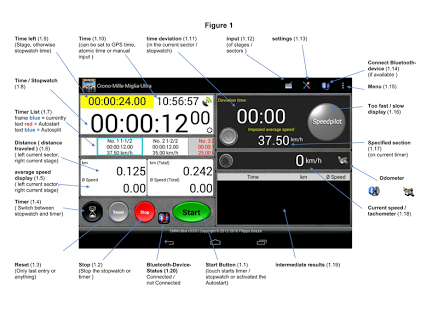
1. Synchronized clock
2. a stopwatch with a split-precision of 1/100 second
3. countdown with a Split-precision of 1/100 second
with Beep or Speech in 3 languages (de, en, it)
4. tripmaster
5. speedmeter that shows you the average speed of the test
6. Speedpilot
7. Speedometer
1. Synchronized clock
The clock can be synchronized with GPS, atomic time or manual.
2. Stoppuhr-Modus
The stopwatch has the splitting function: each time you press the start-button, the stopwatch stops and starts all over again to count.
The result is recorded in a window and can be viewed afterwards.
You can also activate a beep for every second - it also works with a headset.
The reset-button resets the window with the results.
3. Countdown-Modus
The countdown with 1/100 second accuracy, works at single and concatenated mode.
When you insert the time of the tests, you can define that the departure occurs automatically or manually.
Each time you press the start-button, the current countdown stops and the next one starts.
The result is recorded in a window and can be viewed afterwards.
The reset-button resets the results-window and reactivates the stored times.
You can enter different stages with different sectors so that the concatenated mode only from sector to sector.
After the last sector, the timer stops and the green button is disabled.
To reactivate the "Start" you press the "Stop".
4. Tripmaster
The Tripmaster, operating with activated GPS, indicates the speed of the entire mileage and trip odometer at every meter exactly (you can reset it with by touching the text "touch to reset").
In the countdown-mode is the text "touch to reset" invisible.
5. Speedmeter
The speedmeter can show you the average speed of navigation
from the 1st start and also from the current.
6. Speedpilot
The Speedpilot is a function of my App Speedpilot-Pro.
Speedpilot indicates the average speed not only with nummeri but visually with a progress indicator.
Note, however, that this feature is unlocked only after you have purchased the app Speedpilot-Pro.
7. Speedometer
Displays the current speed .
All entered time-stages will be saved if you exit the program.
Thereforce you can use these times for the next race.
You can use for the Start, the green software button "Start" or the Volume keys DOWN or UP (+ -).
The usage of the volume buttons can be activated/disabled via app-settings .
For the start can be used of an external button.
This button is available in two versions, as USB and Bluetooth.
Further information at: http://filippo-software.de
Limitations of the Lite version:
* The total running time is limited to 5 minutes.
System requirements:
The app will appear on each display - but I recommend devices with display from a size of 3.7".
Supported languages:
German, Italian, English
About CMM-Pro
The company that develops CMM-Pro is Filippo-Software. The latest version released by its developer is 4.40.
To install CMM-Pro on your Android device, just click the green Continue To App button above to start the installation process. The app is listed on our website since 2018-01-11 and was downloaded 0 times. We have already checked if the download link is safe, however for your own protection we recommend that you scan the downloaded app with your antivirus. Your antivirus may detect the CMM-Pro as malware if the download link to fg.cronomillemiglia_pro is broken.
How to install CMM-Pro on your Android device:
- Click on the Continue To App button on our website. This will redirect you to Google Play.
- Once the CMM-Pro is shown in the Google Play listing of your Android device, you can start its download and installation. Tap on the Install button located below the search bar and to the right of the app icon.
- A pop-up window with the permissions required by CMM-Pro will be shown. Click on Accept to continue the process.
- CMM-Pro will be downloaded onto your device, displaying a progress. Once the download completes, the installation will start and you'll get a notification after the installation is finished.
Program Details
System requirements
Download information
Pricing
Version History
version 4.40
posted on 2018-01-11
* Adjustments for devices with Android 6+.
Special authorizations must be approved by the user.
* Optimization and bug fixes.
version 3.83.1
posted on 2016-07-02
* CMM-Editor,This Windows application has been developed for the App Crono-Mille-Miglia.,Thus, the entering/editing stages/sectors are to be simplified.,Just download from my website, unzip and execute.,* Small corrections
version 1.17
posted on 2013-06-12
Several fixes and updates
Disclaimer
Official Google Play Link
We do not host CMM-Pro on our servers. We did not scan it for viruses, adware, spyware or other type of malware. This app is hosted by Google and passed their terms and conditions to be listed there. We recommend caution when installing it.
The Google Play link for CMM-Pro is provided to you by apps112.com without any warranties, representations or guarantees of any kind, so access it at your own risk.
If you have questions regarding this particular app contact the publisher directly. For questions about the functionalities of apps112.com contact us.
